
In a SAP BusinessObjects environment connected to SAP BW, the data displayed in a report never comes directly from SAP tables. It is the result of a chain of processing and modeling that must be traced back step by step to identify the real sources.
Starting from the Web Intelligence Report
The first step is to analyze the SAP BusinessObjects report itself. You need to identify the objects used in the report, including dimensions, measures, variables, and filters. This analysis helps you understand which business data is actually being used by the end user.
Identifying the universe (UNX or UNV)
Once the objects are identified, you must trace back to the universe used by the report. In the Information Design Tool or Universe Designer, you can analyze the structure of the objects and the connection used. In most cases with SAP BW, the connection is BICS-type, meaning queries are translated and executed directly in BW without direct SQL access to the tables.
Exploring the SAP BW Layer
The next step is to analyze SAP BW. You need to identify the CompositeProvider or InfoProvider used by the universe. Then, you trace back to underlying objects such as ADSOs or InfoCubes. This is also where you can examine the transformations and modeling rules applied to the data.
Tracing back to datasources and SAP tables
Finally, InfoProviders are fed by BW DataSources. By analyzing these DataSources, you can identify the extractors used as well as the applied transformations. It is at this level that you find the original SAP ECC or S/4HANA tables, such as BKPF, BSEG, VBAK, or MARA, depending on the functional areas.
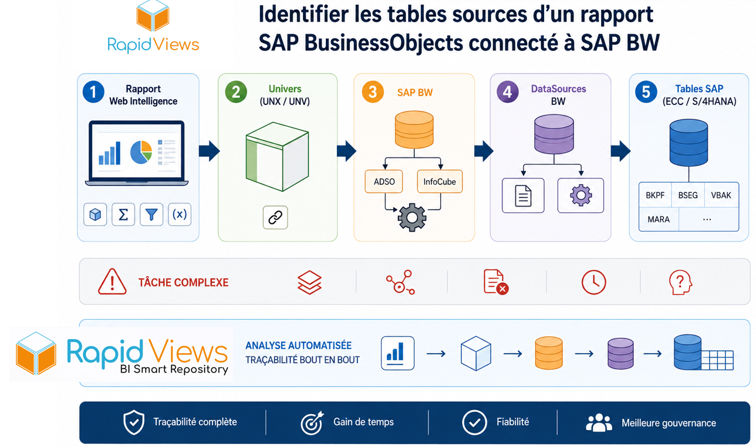
An often complex and time-consuming task
On paper, this approach seems simple. In reality, identifying the source tables of a SAP BusinessObjects report connected to SAP BW can quickly become a complex task:
- Multiplication of technical layers (WebI, Universe, BW, ADSO, DataSources, SAP extractors)
- Dependencies between objects and transformations
- Documentation that is sometimes missing or outdated
- Difficulty in understanding impacts between reports and sources
- Significant time required to reconstruct full traceability In large organizations, a single report can depend on dozens of BW objects and multiple transformations before reaching the final SAP tables.
Automating this analysis with BI Smart Repository
We developed BI Smart Repository to automate this analysis end-to-end. Our solution allows you to:
- Automatically scan SAP BusinessObjects reports
- Identify the universes, objects, and dependencies used
- Automatically trace SAP BW flows back
- Map ADSOs, InfoProviders, and DataSources
- Identify original SAP ECC or S/4HANA tables
- Generate complete data traceability BI Smart Repository thus transforms a long and complex manual analysis into an automated, reliable map that is immediately usable by BI, Data, and business teams.
Conclusion
Identifying the source tables of a SAP BusinessObjects report connected to SAP BW requires a step-by-step approach. You start from the report, then trace back to the universe, then to SAP BW, before reaching the DataSources and finally the SAP tables. This process is essential for understanding the origin of the data, ensuring analysis reliability, and maintaining good traceability in SAP environments. However, this task can become very complex in large BI environments. It is precisely to address this challenge that our BI Smart Repository automates dependency analysis and data traceability for SAP BusinessObjects and SAP BW.