
Column-level Data Lineage: finally understanding your data's journey
In a modern analytics environment, where data passes through multiple systems and transformations before ending up in a report, answering these questions can quickly become a headache. That is precisely the role of Data Lineage And when it’s available down to the column level, it becomes a powerful tool for analyzing, governing, and securing your BI initiatives.
What is Data Lineage?
Data Lineage involves tracing the complete path of a piece of data. In other words, it helps answer a key question: How did this data end up in my report?
Data Lineage traces all the stages of data transformation:
- the data source;
- the processing steps performed;
- the calculations applied;
- the ETL flows;
- the data models;
- the reports that utilize this information.
People often talk about the "roadmap" for your data.
Why has Data Lineage become essential?
Decision-making architectures are becoming increasingly complex. A single data point may pass through SAP ERP, SAP BW or BW/4HANA, SAP Datasphere, a cloud data warehouse, or even Power BI or SAP Analytics Cloud. Transformations may be applied at each stage.
Without visibility into how this data is processed, it becomes difficult to answer even simple questions:
- Is this data calculated or raw?
- What is its source system?
- Who uses it?
- What will be the consequences of a change?
Data Lineage provides this transparency.
Why does column-level Data Lineage make all the difference?
Many tools offer object mapping. But in practice, that isn’t always enough. BI teams often need to go much further. They want to know the exact path of a column, a field, or a metric. Data Lineage.
Thanks to this level of granularity, it becomes possible to track data from its source field all the way to its final display on a dashboard. For example, a "Invoiced Amount" column in a Power BI report may originate from an SAP ERP field, be transformed in SAP BW, enriched in SAP Datasphere, reused in multiple models, and then displayed in multiple reports. Column-level data lineage allows you to instantly visualize this entire journey.
You can then:
- Measure the impact before making a change
- Validate the Analytics setup
- Map out the decision-making framework
Data Lineage in the BI Smart Repository
At RapidViews, we have integrated a Data Lineage feature directly into the BI Smart Repository to help BI teams better understand, document, and secure their analytics assets.
The goal is simple: to enable users to quickly trace the origin of data while providing a clear map of all decision-making processes.
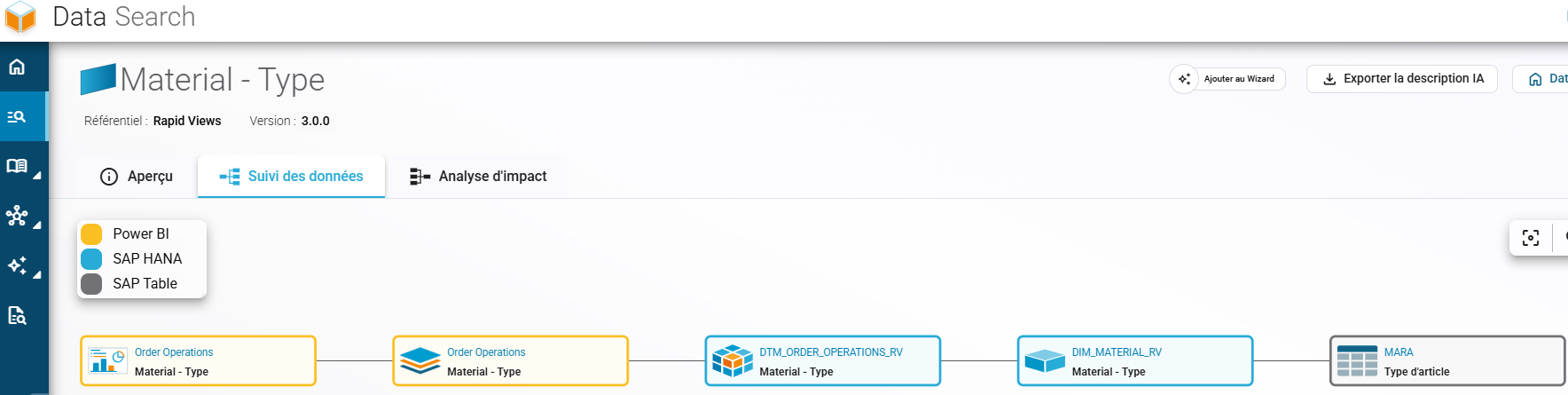
Example of a column lineage in Rapid Views' BI Smart Repository platform
The BI Smart Repository allows you to view the complete path of a data point, from its source system to the final report. Unlike simple object mapping, Data Lineage goes down to the column level.
This enables you to understand precisely:
- where a column comes from;
- what transformations it has undergone;
- which objects use it;
- which reports display this information.
This level of detail greatly facilitates impact analysis and helps you understand changes. For example:
- Save time on your investigations
- Secure your changes
- Map your Analytics environment
In summary
Data only becomes valuable when it is understood. In increasingly complex analytics architectures, knowing where data comes from, how it is transformed, and where it is used has become essential. Column-based Data Lineage addresses this challenge precisely by providing complete data traceability, down to the field level.
With the BI Smart Repository, Rapid Views provides a Data Lineage feature that saves time during investigations, ensures the security of changes, validates the development of analytics, and maps the entire decision-making infrastructure.